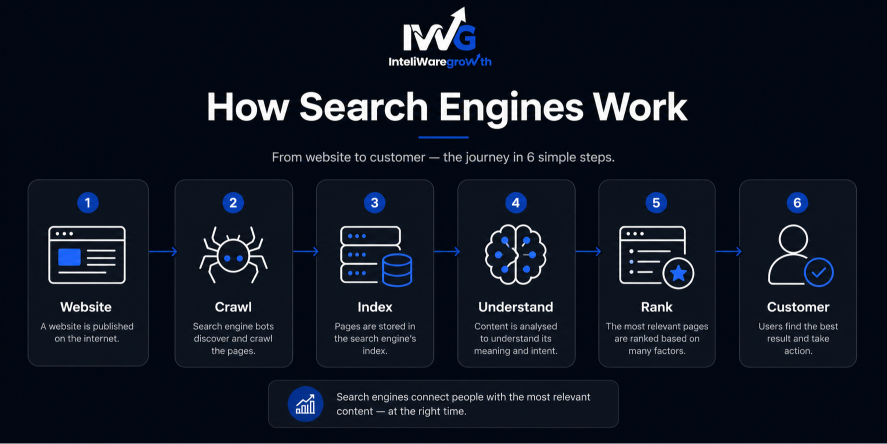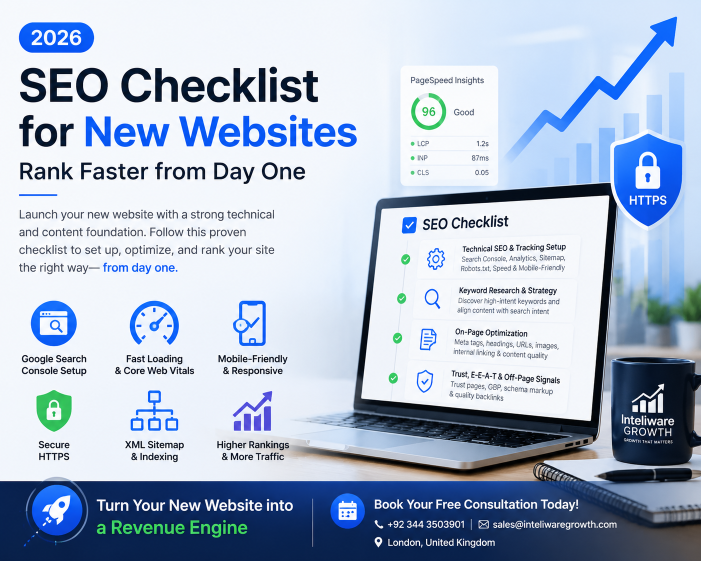
Launch your new website with a strong technical and content foundation. Start by setting up Google Search Console to submit your sitemap and monitor indexing. Ensure fast loading via Google PageSpeed Insights and verify your site is mobile-friendly and secure (HTTPS).
Building a new website requires a strategic, phased approach to ensure search engines can discover, crawl, and rank your content effectively. At Inteliware Growth, we’ve helped dozens of highintent service businesses—from Taxi Companies to immigration law firms—turn brandnew domains into revenuegenerating assets. This checklist walks you through every mustdo step, so you don’t miss a single ranking opportunity.
1. Technical SEO & tracking foundation
Before and immediately after launch, set up the tools and infrastructure that make your site measurable, crawlable, and fast.
Install tracking tools
You can’t improve what you don’t measure. Install Google Analytics (GA4) to understand user behaviour and conversion paths. Pair it with Google Search Console to see exactly which queries bring impressions and clicks. Both are free and nonnegotiable for any new website.
Create & submit your XML sitemap
An XML sitemap lists every page you want search engines to index. Generate one automatically (most CMSs do this) and submit it directly inside Google Search Console. This step helps Google find all your pages, even those with few internal links. Resubmit the sitemap whenever you add new sections or remove outdated content.
Optimize your robots.txt file
The robots.txt file tells search bots where they can and cannot go. For a new site, block staging environments, admin panels, and internal search result pages. A simple, correct robots.txt file prevents wasted crawl budget on lowvalue URLs. Check yours by typing yoursite.com/robots.txt—if it’s missing, create one immediately.
Ensure mobile-friendliness
Over 60% of searches happen on a smartphone. Your site must use a responsive design that adapts seamlessly to any screen size. Run your URL through Google’s Mobile-Friendly Test to get a pass/fail verdict in seconds. Also verify that buttons are tappable, fonts are readable without zooming, and no horizontal scrolling occurs.
Boost site speed (Core Web Vitals)
Page speed is a direct ranking signal. Test your core metrics (LCP, INP, CLS) using Google PageSpeed Insights and pay close attention to improvement recommendations. Compress images, leverage browser caching, and use a content delivery network (CDN) to bring those metrics into the “good” range. A fast site not only ranks higher but also keeps visitors from bouncing back to the search results.
2. Foundational Keyword Research
Keyword planning shapes your content strategy and site architecture from day one.
Identify core keywords
Use tools like Google Keyword Planner, Semrush, or Ahrefs to discover what your target audience actually types into the search bar. Focus on longtail, highintent phrases (e.g., “taxi to Heathrow fixed price” rather than just “taxi”). At Inteliware Growth, we begin every client engagement by mapping the exact search terms that drive paying customers in their niche—be it immigration law, cleaning services, or App Startups.
Align content with search intent
Every query has an intent: informational (“what is a private hire licence?”), commercial (“best taxi company near me”), or transactional (“book a cleaning service London”). Your pages must satisfy the intent behind the keyword. If someone searches “immigration lawyer fees,” give them a clear pricing page, not a blog post about visa types. Matching intent reduces bounce rate and signals to Google that your page is the answer.
Build topic clusters & site architecture
Group related keywords into topic clusters. A pillar page (e.g., “SEO for Immigration law firms”) links to cluster pages on subtopics (“local SEO for solicitors,” “Google Ads for Immigration lawyers”). This architecture strengthens internal linking, establishes topical authority, and makes your navigation natural for both users and crawlers.
3. On-Page Content Optimization
Every page you publish should be tuned for clarity, relevance, and search engine comprehension.
Craft unique meta tags
Title tags (under 60 characters) and meta descriptions (under 160 characters) are your shop window in the search results. Include your primary keyword naturally, but write for a human who is deciding whether to click. Never duplicate them across pages; each one must be unique and compelling.
Use proper heading hierarchy
Organise content with one H1 tag per page, followed by H2 and H3 subheadings that break down the topic. This hierarchy improves readability and helps Google parse the structure of your information. Avoid skipping levels (e.g., going from H1 straight to H3) because that confuses both users and search bots.
Write clean URL slugs
Keep URLs short, descriptive, and readable. A slug like /seo-checklist-new-websites is far better than /p=123. Include your target keyword when it makes sense, and separate words with hyphens. Avoid dates or numbers that will age the URL over time.
Optimize images
Large image files are the most common speed killer. Compress every visual with a tool like TinyPNG before uploading. Add descriptive alt text that explains what’s in the image and, where relevant, includes a keyword. This practice improves accessibility and gives search engines another signal of page relevance.
Strengthen internal linking
Every new page should link to at least two or three other relevant pages on your site. Internal links distribute authority, guide users deeper into your content, and help search engines discover new pages faster. For example, a blog about Google Ads could naturally link to our Google Ads management services or to a case study on scaling a taxi company bookings.
4. Trust, E-E-A-T & Off-Page Signals
Demonstrate authority to both users and algorithms so your new site earns the trust it needs to rank.
Add essential trust pages
Visitors (and Google) expect clear, accessible information about who is behind the site. Create and link to an about us page that explains your expertise, a Contact page with a physical address and phone number, a Privacy Policy, and Terms of Service. These are baseline trust signals that can also help with E-E-AT evaluation.
Claim your local presence
If your business serves a specific geographic area, claim and optimise your Google Business Profile. Fill out every field: category, hours, services, and highquality photos. Local SEO is crucial for industries like Taxi Companies, cleaning services, and medical clinics. At Inteliware Growth, we build dedicated local landing pages for clients in these sectors—you can see examples on our [View all services](https://inteliwaregrowth.com/Services) page.
Implement schema markup
Structured data (schema) helps search engines understand what your content means, not just what it says. Add Organisation schema on your homepage, Article schema on blog posts, and FAQ schema when you answer common questions. Schema can unlock rich snippets—such as star ratings, sitelinks, and direct answers—which improve clickthrough rates, even for new websites.
Conclusion
Launching a new website without a clear SEO roadmap is like opening a shop in a dark alley. By methodically checking off each item in this checklist—from Google Search Console setup to schema markup—you lay a foundation that allows organic search to become a reliable, compounding source of traffic.
Yet, SEO is a long game. If you need immediate, qualified leads while your organic presence grows, paid search and conversion optimisation can bridge the gap. That’s exactly where Inteliware Growth excels: building datadriven Google Ads and CRO frameworks for highintent service businesses across the UK. Browse our case studies to see how we’ve turned new websites into revenue engines for Immigration lawyers, cleaning companies, and taxi firms.
Ready to turn your new website into a revenue engine? Book Your Free Consultation today, and let’s build a custom growth roadmap for your niche.
Contact Us
📞 +92 344 3503901
📧 sales@inteliwaregrowth.com
📍 London, United Kingdom
Frequently Asked Questions
How long does it take for a new website to rank on Google?
With a solid technical setup and quality content, you can see initial rankings for lowcompetition keywords in a few months. Highly competitive terms often take six to twelve months.
What is the single most important SEO factor for a new website?
Technical health paired with intentfocused content. Without proper crawling and indexing, nothing else matters, and without relevant content, even a flawless site won’t rank.
Do I really need HTTPS for SEO?
Yes. HTTPS is a confirmed ranking signal, and browsers flag nonsecure sites with warnings, which hurts user trust.
Should I focus only on SEO or also run ads for my new website?
A blended approach works best. Ads bring instant leads while SEO ramps up, and CRO data from paid traffic helps strengthen your organic landing pages.
How do I know if my SEO checklist is working?
Monitor impressions, clicks, and average position in Google Search Console. A steady upward trend for target keywords signals your efforts are paying off.