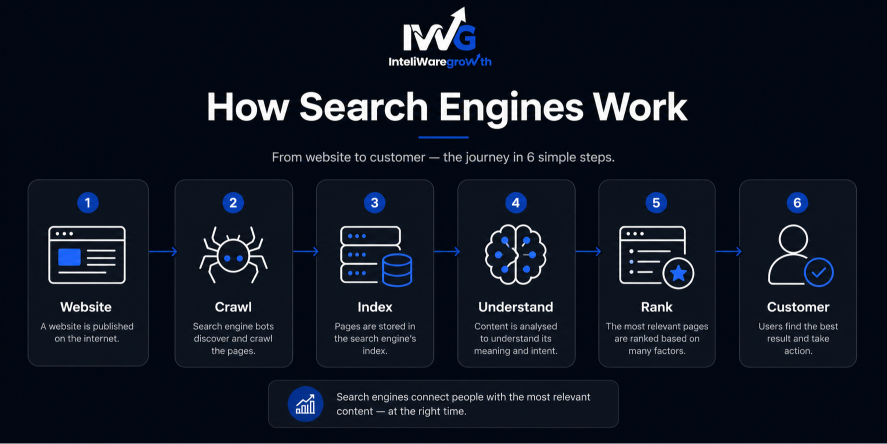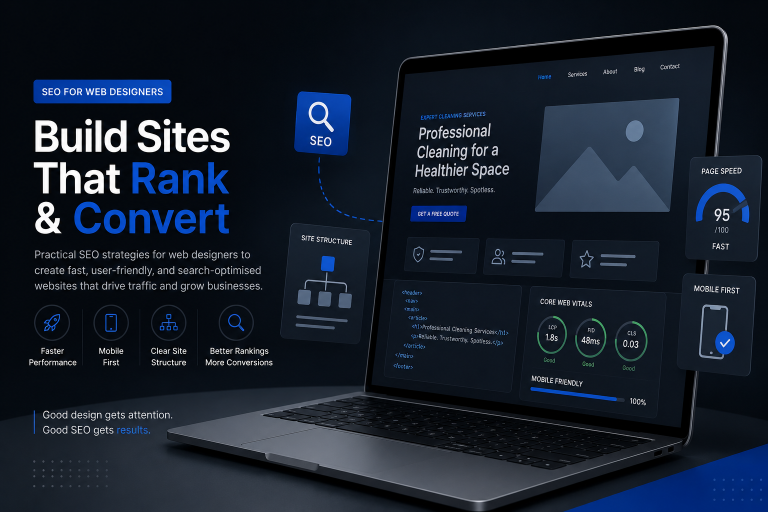
Good web design and search engine optimization (SEO) must work together from day one. A visually stunning website fails if search engines cannot read it or users cannot load it quickly.
Designers often prioritise aesthetics and brand identity. However, without a solid SEO foundation, even the most beautiful site remains invisible in search results. For high-intent service businesses — taxi firms, immigration lawyers, cleaning companies, clinics — that invisibility costs revenue.
This guide bridges the gap. You’ll learn exactly which SEO elements to embed into your design process, how to answer common client questions, and how to deliver a site primed to rank.
What is SEO in web designing?
SEO in web designing is the practice of planning and building websites so that search engines can crawl, understand, and rank them effectively. It goes beyond keywords and content. It starts with architecture, code, performance, and accessibility decisions made at the design stage.
When SEO is built-in, you get:
- Logical site structure that helps bots find every page.
- Fast, mobile-responsive layouts meeting Core Web Vitals.
- Clean semantic code that communicates content hierarchy.
- Optimised media that never slows the experience.
- Secure, accessible foundations aligned with Google’s priorities.
Ignoring SEO during design means costly retrofits later. Treat search visibility as a core design constraint, just like grid systems or colour theory.
Why web designers must care about SEO
Your work impacts client revenue
A pixel-perfect design means nothing if potential customers never find it. When you build for a London taxi company or a doctor’s clinic, that site must generate leads. Designing for search makes your work perform where it matters: on the SERP.
Clients will ask these questions
Every designer hears, “Why isn’t my site on Google?” Understanding design-led SEO lets you provide informed answers, set realistic expectations, and add immediate value to your services.
Search engines are your toughest users
Bots read raw HTML, follow links, and interpret structure. Designing for search means ensuring every visual element has a machine-readable signal. That skill separates good designers from great ones.
Core design elements for SEO
These four principles directly affect search performance and user behaviour. Build them in from the wireframe stage.
Mobile-first layout
Ensure the site looks and works great on small screens because search engines rank mobile versions first. Google uses mobile-first indexing, so the mobile experience determines your rankings. Hidden content, tiny fonts, or broken navigation on mobile will hurt you.
Design actions:
- Start with the smallest breakpoint and enhance progressively.
- Serve responsive images at appropriate sizes.
- Make all interactive elements touch-friendly (minimum 48×48px tap targets).
- Avoid intrusive interstitials that block mobile content.
Fast load speed
Keep files small, compress images, and limit heavy scripts to prevent high bounce rates. Page speed is a confirmed ranking factor. A one-second delay can reduce conversions by up to 7%.
Design actions:
- Set a performance budget: target Largest Contentful Paint (LCP) under 2.5 seconds.
- Use modern formats like WebP with lazy loading.
- Minimise custom fonts; load only needed weights and character sets.
- Defer non-essential JavaScript to eliminate render-blocking resources.
Clear site structure
Use a simple menu hierarchy and logical URL paths so search bots can easily crawl every page. A flat architecture so any page reachable within three clicks helps distribute link equity and ensures indexing.
Design actions:
- Limit primary navigation to five or six items.
- Group related pages under category parents and reflect this in breadcrumbs.
- Design HTML and XML sitemaps as standard deliverables.
- Use descriptive, keyword-rich slugs (e.g., /cleaning-services-london).
Readable typography
Use standard font sizes (at least 16px for body text) and strong colour contrast for accessibility. Google increasingly rewards accessible, readable experiences. Poor contrast or tiny fonts increase bounce rates and send negative user signals.
Design actions:
- Maintain a 4.5:1 contrast ratio for normal text per WCAG AA.
- Set line height to 1.5–1.75 and limit paragraph width to 65–75 characters.
- Choose web-safe or performance-optimised fonts.
- Never use text as images; search engines can’t read it.
Technical essentials to build in
Once visual principles are set, these four technical elements must be coded correctly to communicate with search engines.
Header tags (H1, H2, H3)
Maintain a single H1 per page followed by a clean, nested outline of subheadings. Header tags create a semantic outline that helps Google understand topic hierarchy.
Implementation guide:
- Align the H1 with the page’s target topic and title tag.
- Use H2s for main sections, H3s for subsections; never skip levels.
- Integrate keywords naturally into headings, not forcefully.
- Rely on CSS for visual styling, not heading tags.
Image optimization
Name image files clearly and add descriptive alt text for accessibility and image search. Image search drives significant traffic, especially for service businesses showcasing their work.
Implementation guide:
- Rename files: commercial-cleaning-before-after.webp, not IMG_0043.webp.
- Write alt text that describes the content; include a keyword only if it fits naturally. Decorative images get an empty alt.
- Compress images using tools like Squoosh, targeting under 100 KB.
- Specify width and height attributes to prevent Cumulative Layout Shift.
Clean code markup
Use semantic HTML5 elements instead of generic containers. Tags like <header>, <nav>, <main>, <article>, and <footer> provide built-in meaning that helps parsers understand structure.
Implementation guide:
- Replace <div class="header"> with <header>.
- Wrap primary content in <main>, standalone pieces in <article>.
- Use <nav> for navigation blocks.
- Validate HTML to avoid broken elements confusing crawlers.
Secure protocol
Set up HTTPS security configurations before launch. HTTPS is a ranking signal, and browsers warn users visiting insecure sites. A non-secure site instantly kills trust and leads.
Implementation guide:
- Install an SSL/TLS certificate and 301-redirect all HTTP to HTTPS.
- Ensure all internal resources load over HTTPS to avoid mixed content warnings.
- Update canonical tags and sitemaps to reflect HTTPS URLs.
- Implement HSTS headers.
Can a beginner do SEO?
Absolutely. Many foundational SEO tasks are design-adjacent and beginner-friendly. If you can build a website, you can implement on-page SEO. Focus on the structural elements covered in this guide rather than advanced link-building.
A beginner web designer can handle:
- Structuring clear, keyword-informed headings.
- Optimising images and code for speed.
- Ensuring mobile responsiveness.
- Setting up clean, crawlable navigation.
- Using descriptive, readable URLs.
Start with the essentials.
Test your site’s performance using Google PageSpeed Insights.
Confirm mobile responsiveness with Google’s Mobile-Friendly Test.
Then grow from there.
Can I do SEO for my website myself?
Yes, and as a web designer, you’re in a strong position. You control the code, layout, and content placement. Self-serve SEO typically involves keyword research with free tools (Google Keyword Planner), writing unique title tags and meta descriptions, optimising on-page elements, submitting your sitemap to Search Console, and monitoring errors.
If you’re designing for a niche service — say, an immigration law firm — you can create dedicated landing pages targeting specific enquiries like “UK spouse visa lawyer.” For personal portfolio sites, SEO is entirely manageable. When a project outgrows your capacity, a specialist agency can take over without undoing your good foundational work.
Can ChatGPT do SEO?
ChatGPT can assist with many SEO tasks, but it cannot replace strategic human oversight. AI excels at generating keyword ideas, drafting meta titles, writing alt text at scale, and producing schema markup snippets. However, it cannot audit your specific site, understand a niche taxi market’s local intent, or make UX trade-off decisions. It also may produce outdated information.
The best approach: use AI as an assistant to generate ideas and refine content, but always apply your design thinking and validate outputs against Google’s official guidelines.
A lean SEO checklist for web designers
Before pushing any client site live, verify these ten essentials:
- A flat site architecture and logical URLs
- Full mobile responsiveness down to 320px
- LCP under 2.5s with compressed images and minified code
- 16px minimum body text meeting WCAG AA contrast
- A single H1 with correctly nested subheadings
- Descriptive image filenames and alt text
- Semantic HTML5 validated code
- HTTPS enforced with zero mixed content
- Unique title tags and meta descriptions for every page
- An auto-generated XML sitemap submitted to Search Console
Complete this list, and your design is search-ready.
How Inteliware Growth turns well-designed sites into revenue engines
A search-friendly design sets the stage, but in competitive service niches — taxi companies, immigration lawyers, app startups, cleaning businesses, and medical clinics — ranking alone isn’t enough. You need a strategy to capture high-intent traffic and convert it into paying customers.
At Inteliware Growth, we build data-driven growth frameworks specifically for these industries. Our team audits the user journey, launches precise paid campaigns on Google and Meta, and optimises every step of the conversion funnel.
Our 5-step framework works hand-in-hand with solid web design:
- Audit – We analyse competitors, audience intent, and your site’s strengths.
- Strategy – We map KPIs, forecast budgets, and align channel tactics.
- Execution – We build custom landing pages and ad creatives that match your brand.
- Tracking – We implement advanced attribution so you see exactly what drives leads.
- Scale – We increase budgets only on proven, automated data.
Conclusion
SEO for web designers isn’t an add-on — it’s a fundamental layer of professional craft. When you prioritise mobile-first layouts, fast load times, semantic code, and clear navigation, you create sites that both humans and search engines love. That is the ultimate goal: a site that looks exceptional and drives business.
Your designs deserve to be seen. By embedding these principles into your workflow, you guarantee the websites you create are ready to compete in search, attract the right visitors, and convert them into real revenue for your clients.
If you’re ready to explore how design-led SEO can accelerate growth for your next project — or need a performance team to fuel a newly launched site — Inteliware Growth is here to help.
Frequently Asked Questions
What is SEO in web designing?
It's the process of making websites crawlable, understandable, and rankable by search engines through smart architecture, code, and design choices.
Can ChatGPT do SEO?
It can help with drafts, ideas, and code snippets, but it can't replace a human's strategic oversight, site audits, or nuanced market understanding.
Can a beginner do SEO?
Yes. Beginners can master on-page fundamentals like heading structure, image optimisation, and mobile-friendly design with minimal learning curve.
Can I do SEO for my website myself?
Absolutely. As a web designer, you already control the technical environment, making self-serve SEO straightforward with free tools and checklists.
Contact Us
📞 +92 344 3503901
📧 sales@inteliwaregrowth.com
📍 London, United Kingdom