Introduction
Imagine this: a potential client in London urgently needs a taxi to the airport. They search on their phone, click your Google ad, and land on your booking page.
The page shows a white screen for four seconds. Then a “Book Now” button appears—only to jump down because an image loaded late.
Frustrated, they leave and try your competitor. In that moment, you didn’t just lose a booking. You lost ad spend, a customer, and trust.
That’s exactly the kind of user experience Google’s Core Web Vitals are designed to measure and penalise. They are no longer a “nice-to-have” technical SEO checkbox.
They directly influence how your site ranks, how efficiently your paid ads convert, and how real people feel when interacting with your brand.
At Inteliware Growth, we’ve seen how optimising these metrics turns underperforming pages into lead-generating machines for Taxi Companies, immigration law firms, cleaning services, doctors’ clinics, and App Startups.
In this guide, you’ll learn what Core Web Vitals are, why they matter for your business, and how to measure and improve them—with practical, actionable advice.
What Are Core Web Vitals?
Core Web Vitals are a set of specific, user-centric performance metrics introduced by Google. They measure real-world user experience on your site.
Unlike lab-based metrics run in a controlled simulation, Core Web Vitals are based on field data—measurements collected from actual Chrome users visiting your pages. This makes them a genuinely reliable signal of how fast, interactive, and visually stable your site is for the people who matter most: your customers.
Google has integrated these metrics into its ranking algorithms as part of the broader Page Experience update. So while relevant content remains the backbone of SEO, a page that frustrates users with slow loads or janky interactivity will find it harder to compete.
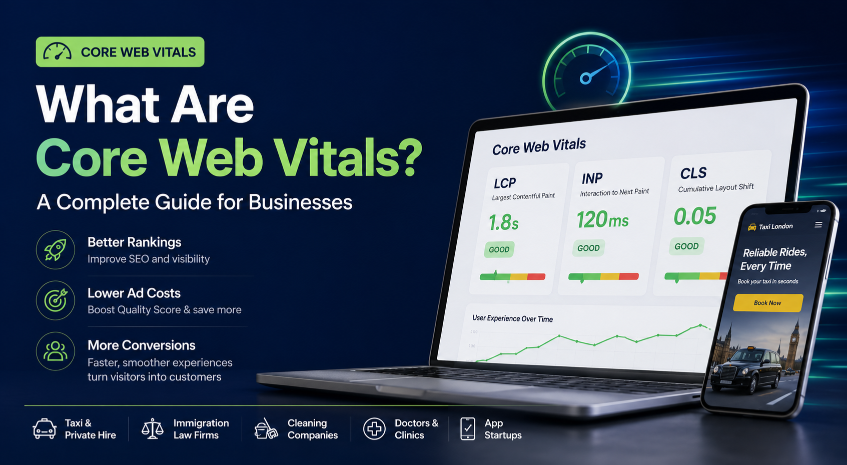
There are three Core Web Vitals, each targeting a different pillar of user experience:
- Largest Contentful Paint (LCP) – loading performance
- Interaction to Next Paint (INP) – interactivity
- Cumulative Layout Shift (CLS) – visual stability
Each metric has a clear “good” threshold. Meeting these thresholds site-wide positively impacts your organic search visibility, ad quality scores, and conversion rates.
Let’s look at why that matters specifically for service businesses like yours.
Why Core Web Vitals Matter for Your Business
If you run a taxi firm, an immigration law practice, a cleaning company, a medical clinic, or an app startup, every second of delay chips away at your bottom line.
Research shows that 53% of mobile visits are abandoned if a page takes longer than 3 seconds to load. That’s a direct pipeline of lost leads.
Impact on SEO Rankings
Google confirmed that Core Web Vitals are part of the ranking signal for all pages. In competitive local niches—like “immigration solicitor London” or “taxi near me”—a fast, stable site often becomes the tie-breaker.
When two firms have similar content authority, the page with a lower LCP and zero layout shifts typically wins the click.
Impact on Google Ads & Quality Score
If you’re running Google Ads, your landing page experience directly influences Quality Score. A poor LCP or high CLS can lower that score, raising your cost-per-click (CPC) and dropping your ad rank.
In practical terms, a sluggish landing page means you pay more for every click and appear below competitors who have invested in performance.
Our Google Ads management service always includes landing page optimisation through Core Web Vitals. Even a 0.5-second improvement can trim acquisition costs significantly.
Real-World Impact on Conversions for Your Industry
At Inteliware Growth, we tailor our frameworks to five core sectors. Here’s how poor vitals can directly hurt each one:
- Taxi & Private Hire Companies: A booking widget that loads slowly or shifts around can cause users to tap the wrong date or vehicle type—resulting in abandoned bookings.
- Immigration law firms: A contact form with high INP (lag when typing) makes the firm seem unprofessional at the exact moment a client decides whom to trust with a life-changing case.
- Cleaning Companies: A “Get a Quote” button that jumps after images load leads to accidental clicks and high bounce rates, reducing quote requests.
- Doctors & Clinics: An online appointment system that isn’t instantly responsive pushes patients toward a competing clinic where the booking experience is seamless.
- App Startups: A landing page for app installs with layout shift can break the “Download” button, tanking your install conversion rate and inflating user acquisition costs.
When we conduct an audit, we don’t treat Core Web Vitals as a standalone tech fix. We view them as a conversion rate optimisation lever.
A faster, more stable page removes friction, builds trust, and keeps users moving toward that phone call or form submission.
Breaking Down the Three Core Web Vitals
Each metric has a clear threshold defined by Google. This table shows what’s “good,” “needs improvement,” and “poor.”
Note: INP officially replaced First Input Delay (FID) as a Core Web Vital in March 2024. It better captures the responsiveness of a page throughout the entire user session.
Largest Contentful Paint (LCP) – The Loading Speed Signal
What it is: LCP marks the point when the main content—often a large hero image, a headline text block, or a background video—has fully rendered. If your LCP is within 2.5 seconds, users perceive the page as snappy.
Common causes of poor LCP:
- Uncompressed, huge images (a 5MB hero image is a conversion killer)
- Slow server response times
- Render-blocking JavaScript and CSS
- Not using a Content Delivery Network (CDN)
How to improve LCP for a service business:
- Optimise your hero image. For a taxi firm’s booking page, serve the background image in WebP format and compress it to under 200KB. Never lazy-load the main image.
- Upgrade hosting or use a CDN. If your server takes more than 200ms to respond, consider managed hosting or a CDN like Cloudflare.
- Minimise critical CSS. Inline only the styles needed for above-the-fold content and defer the rest.
- Preload the LCP image. Add <link rel="preload"> so it jumps to the front of the queue.
Interaction to Next Paint (INP) – The Responsiveness Signal
What it is: INP captures the delay between a user’s interaction—like clicking “Book Consultation” for an immigration law firm—and the moment the browser actually shows visual feedback. A good INP (≤200ms) ensures every tap feels instantaneous.
Common causes of poor INP:
- Heavy JavaScript tasks that block the main thread
- Event handlers triggering complex recalculations
- Third-party scripts (live chat widgets, analytics) hogging resources
How to improve INP:
- Break up long JavaScript tasks. Use setTimeout or Web Workers to yield to the main thread.
- Debounce and throttle event handlers. For search input fields on an app startup’s landing page, limit how often the filtering logic runs.
- Audit third-party scripts. If a live chat plugin pushes INP over 500ms, load it asynchronously or replace it with a lighter alternative.
Cumulative Layout Shift (CLS) – The Visual Stability Signal
What it is: CLS measures how much elements move around unexpectedly as the page loads. The classic nightmare: a user is about to tap “Call Now” on a cleaning company’s mobile page, and an image loads above it, pushing the button down and causing a mis-tap. A CLS score of 0.1 or less means the page stays visually stable.
Common causes of poor CLS:
- Images or videos without set width and height attributes
- Dynamically injected content (banner ads, newsletter pop-ups) that shift existing text
- Web fonts causing flash of un styled text (FOUT) or invisible text (FOIT)
How to improve CLS:
- Always include width and height on images, videos, and iframes. Browsers will reserve the correct space.
- Reserve space for ads and embeds. Use a placeholder div with calculated dimensions.
- Preload fonts and use font-display: optional to minimise text movement.
- Never insert new content above existing content unless triggered by a user action. For instance, don’t auto-inject a banner above the fold on a doctor’s booking page.
How to Measure Your Core Web Vitals
You don’t have to guess your scores. Google provides free, powerful tools to check both field data and lab data.
- Google Search Console – Core Web Vitals report This business-friendly dashboard shows exactly which pages pass or fail based on real-world Chrome User Experience Report (CrUX) data. It groups URLs by status (Poor, Needs Improvement, Good), so you can prioritise fixes.
- PageSpeed Insights (PSI) Enter any URL, and PSI pulls field data from CrUX (if available) and runs a Lighthouse audit. It gives colour-coded assessments for each metric plus specific recommendations.
- Lighthouse (in Chrome DevTools) Ideal for developers during testing, Lighthouse simulates a mid-tier mobile device on a throttled network. While not field data, it’s excellent for catching regressions.
- Web Vitals Chrome Extension Quickly inspect LCP, INP, and CLS as you browse your own site in real time—great for sanity checks.
Remember, the metric that counts for SEO is the field data collected over a 28-day rolling window. A one-time lab improvement won’t immediately lift rankings; consistent real-user improvements will.
For deeper tracking, our team builds custom real-time dashboards that tie Core Web Vitals fluctuations directly to lead volume and cost-per-lead. You’ll see exactly how every speed improvement affects your bottom line.
How Core Web Vitals Affect Your Google Ads Performance
If you’re spending money on Google Ads, your landing page Core Web Vitals directly influence Quality Score. Google evaluates landing page experience based on relevance, transparency, and ease of navigation—which are undercut by poor load times, unresponsive interactions, and jarring layout shifts.
A low Quality Score can:
- Increase your cost-per-click (CPC) by up to 50% or more
- Reduce impression share, so your ad shows for fewer searches
- Push your ad to lower positions even if you bid higher
This is why we integrate Core Web Vitals optimisation into every Google Ads management engagement. Before we launch a campaign for a taxi company or immigration law firm, we audit the landing page’s LCP, INP, and CLS.
If a “Book a Ride” page takes 3.8 seconds to become interactive, we fix it first. Running ads to a poor page is like pumping water into a leaky bucket.
Once the page is fast and stable, your ad budget works harder, driving a higher conversion rate at a lower cost.
How Inteliware Growth Optimises Core Web Vitals for Service Businesses
We follow a five-step framework that turns technical performance metrics into scalable revenue.
1. Audit We map every URL, identify template issues (booking flow, contact forms, blog), and use CrUX data to see where real users suffer. We benchmark your vitals against competitors in your niche. If the top-ranked immigration solicitor has an LCP of 1.9 seconds and you’re at 4.2, we know exactly what gap to close.
2. Strategy We build a custom roadmap with measurable KPIs: “Improve mobile LCP to ≤2.2s for the cleaning service quote page within 30 days.” The strategy includes specific tasks, responsible teams, and forecasted impact on conversion rate and Quality Score.
3. Execution Our technical SEO and CRO specialists implement improvements—compressing hero images, rewriting render-blocking JavaScript, adding size attributes to ad creatives. We handle all development coordination so you can focus on clients.
4. Tracking We set up advanced dashboards that monitor Core Web Vitals alongside lead submissions, phone calls, and ad spend. You’ll know within days if a CLS fix on the “Request a Callback” form drives more leads.
5. Scale When we see winning patterns, we double down. For example, if a page speed upgrade on a doctor’s appointment page lifts patient bookings by 15%, we roll out the same optimisation across all clinic location pages.
No guesswork—only data-driven scaling, just as described in our case studies.
Quick Wins to Improve Your Core Web Vitals (Actionable Checklist)
If you’re not ready for a full engagement yet, here are some immediate fixes any business can implement:
- Compress and convert images to WebP. Use a tool like ShortPixel or a CDN with image optimisation.
- Set explicit width and height on all media elements to reserve space and eliminate CLS.
- Implement lazy loading for below-the-fold images and iframes, but ensure the LCP image loads eagerly.
- Minify and combine CSS/JS files to reduce render-blocking requests.
- Enable text compression (Gzip or Brotli) on your server.
- Use a Content Delivery Network (CDN) to serve assets from a location closer to your users.
- Remove or defer non-critical third-party scripts. Audit live chat, heatmaps, and tracking scripts; load them asynchronously.
- Preconnect to external origins like Google Fonts or analytics domains.
- For WordPress sites, use a quality caching plugin (like WP Rocket) and consider a lighter theme if layout stability is poor.
- Monitor real-user metrics monthly via Google Search Console to catch regressions before they hurt rankings.
Even small improvements, like reducing an LCP from 3.2s to 2.4s, can yield a measurable uplift in organic clicks and ad conversions for your service business. For a broader perspective on why these metrics matter for SEO, Moz’s performance metrics guide is an excellent resource.
Frequently Asked Questions About Core Web Vitals
Do Core Web Vitals directly affect my Google rankings? Yes. Google incorporates them into its page experience ranking signal. While content relevance remains king, a page with poor vitals may be outranked by a faster, more stable competitor offering similar information.
What’s the difference between lab data and field data? Lab data (e.g., Lighthouse) is collected in a controlled environment and is useful for debugging. Field data (CrUX, Search Console) is gathered from real Chrome users and is what Google uses for ranking. Always base your priorities on field data.
How often should I check my Core Web Vitals scores? At minimum, check the Google Search Console report monthly. When actively making changes, use the CrUX dashboard or set up automated alerts so you immediately know if a deployment worsens your INP or CLS.
Can Core Web Vitals impact my Google Ads performance? Absolutely. Landing page experience, heavily influenced by LCP and CLS, feeds into Quality Score. Poor vitals can increase your CPC and lower your ad rank, costing you leads and budget.
My site passes Core Web Vitals but still feels slow. Why? Core Web Vitals measure specific aspects of UX. You may still have heavy below-the-fold content, sluggish server response, or excessive animation that impacts perceived performance. A full performance audit goes beyond just the three metrics.
What is a good LCP score for mobile? Google’s threshold for “good” is 2.5 seconds or less, regardless of device. Achieving sub-2.5s LCP on a 4G network is a strong competitive advantage in local service industries.
How do I fix CLS on my WordPress site? Start by ensuring all your images and ads have width and height attributes. Use a caching plugin that supports lazy loading with a placeholder, choose a well-coded theme, and be cautious with pop-up builders. For persistent issues, our team can perform a targeted CLS audit.
A Stable, Fast Site Is Your Strongest Marketing Asset
Core Web Vitals aren’t just a technical distraction. They’re a direct reflection of how much you respect your visitors’ time and attention.
In the competitive world of local services, the speed and stability of your digital storefront can mean the difference between a qualified lead and a silent bounce.
At Inteliware Growth, we believe every millisecond of load time, every unexpected layout shift, and every laggy click chips away at trust and conversions.
That’s why we embed Core Web Vitals optimisation into our performance marketing DNA. We help Taxi Companies, Immigration lawyers, cleaning services, doctors, and App Startups turn technical excellence into measurable growth.
Ready to see how your site performs and what it’s costing you? We’ll run a comprehensive Core Web Vitals and CRO audit—completely free—and map out a custom strategy to hit Google’s green thresholds while converting more visitors into paying customers.
How Inteliware Growth Helps
We integrate Core Web Vitals optimization into our Audit → Strategy → Execution → Tracking → Scale framework to improve both rankings and conversions.
Contact Us
📞 Phone: +92 344 3503901
📧 Email: sales@inteliwaregrowth.com
📍 Location: London, United Kingdom