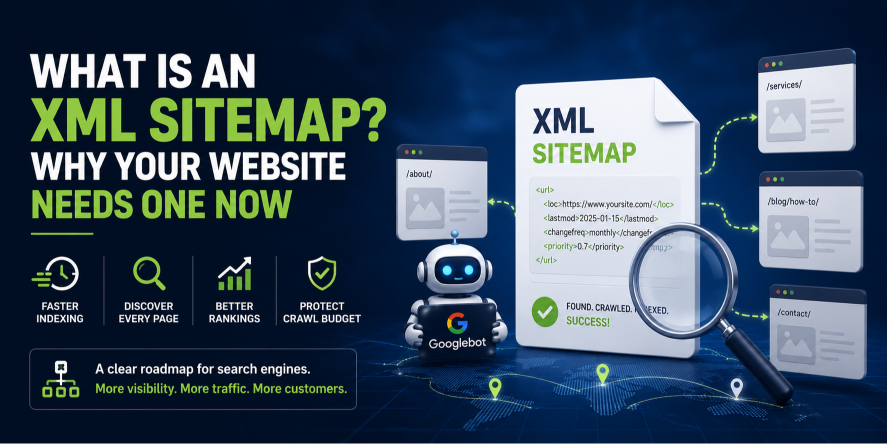
An XML sitemap is a structured text file (formatted in Extensible Markup Language) that lists a website's essential URLs. It acts as a roadmap for search engines like Google, telling them exactly which pages exist, when they were last updated, and how they relate to one another.
Think of it as a backstage pass you hand directly to Googlebot. Instead of hoping a crawler stumbles upon your deepest service pages or newest blog post, you lay out a clear, machine-readable index of everything you want indexed. For the niche service businesses, we partner with at Inteliware Growth, from immigration law firms to taxi companies, this single file often makes the difference between invisibility and a fully indexed, high-performing website.
What exactly is an XML sitemap?
An XML sitemap is a plain-text file that uses specific tags defined by the Sitemaps XML protocol. It isn’t designed for human visitors. Its sole job is to communicate with search engines.
A typical entry looks like this:
<url>

  <loc>https://www.yoursite.com/contact/</loc>

  <lastmod>2025-01-15</lastmod>

  <changefreq>monthly</changefreq>

  <priority>0.7</priority>

</url>
Each <url> block contains a page’s location and optional metadata. The <lastmod> tag tells Google the last meaningful update, which matters for fresh content like immigration law changes. The <priority> tag hints at relative importance; while not a ranking factor, it still guides crawl behaviour. Don't confuse this with an HTML sitemap, a visible page for users. The XML sitemap is purely for search engines.
How does an XML sitemap work?
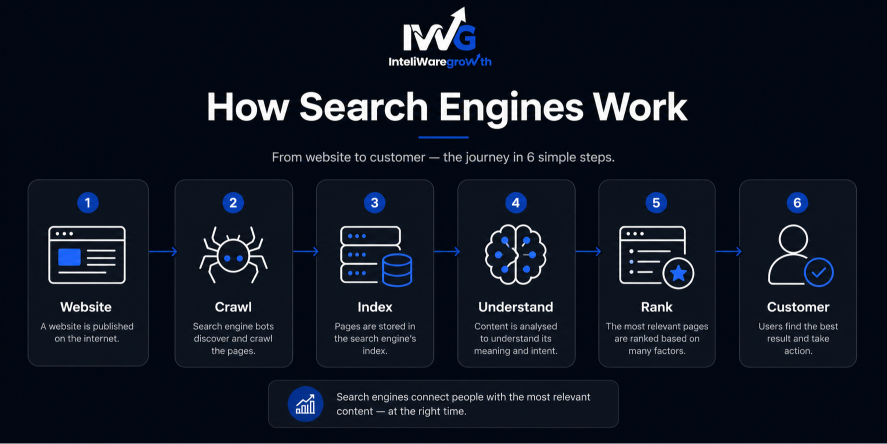
The process is straightforward. When a crawler arrives, it checks your robots.txt file, which often points to your sitemap. The crawler then reads the sitemap to understand your site’s structure.
It discovers URLs, notes modification dates, and queues those pages for crawling. For a large site with thousands of location pages, like a taxi company covering every London postcode, the sitemap may be split into a sitemap index that references smaller, category-specific sitemaps. This helps the crawler process everything without missing a single ride-booking landing page.
Why your website absolutely needs an XML sitemap
Modern crawlers can follow links, but an XML sitemap remains critical. In our work with high-intent service industries, we see that top-ranking sites treat their sitemaps as a living asset. Here’s exactly why it matters.
Speeds up content indexing
When you publish a new blog post, launch a product, or update a service page, you want Google to find that change fast. Without a sitemap, you rely on recrawling from the homepage, which can take days. A maintained sitemap pings search engines about the change, dramatically reducing indexing time. For a law firm announcing a new visa service, those days can mean lost clients.
Finds orphan pages and deep content
Pages with no internal links, like dedicated campaign landing pages, may never be found. A sitemap guarantees these orphan pages are discovered and indexed, giving them a chance to rank organically long after your paid campaign ends.
Improves crawl efficiency and protects your crawl budget
Search engines have a limited crawl budget. For service sites with a unique page for every suburb, that budget is precious. A sitemap helps Google focus on canonical, high-value pages and ignore duplicate or staging URLs, directing crawl energy exactly where leads are generated.
Essential for large or dynamic websites
If your site has thousands of pages, dynamic content, or rich media like video testimonials, a sitemap acts as the master inventory. Specialised extensions (video, image, news) can surface rich snippets, like a video thumbnail for a doctor explaining a procedure.
Critical for new websites with few backlinks
A new startup has little authority. Googlebot won't visit often. Submitting a sitemap through Google Search Console is the fastest way to signal your site’s existence and kickstart indexing. When we launch growth frameworks for app startups, this is the very first technical step.
Types of XML sitemaps you should know about
A standard page sitemap is only the start. To fully leverage search visibility, use the right format.
- Standard page sitemap: Lists HTML pages you want indexed.
- Image sitemap: Helps Google discover images. Vital for clinics showcasing results or Cleaning Companies showing before-and-after work.
- Video sitemap: Provides metadata for video, enabling rich snippets. Ideal for Immigration Lawyers’ guides or taxi app demos.
- News sitemap: For time-sensitive articles. Required for Google News inclusion.
- Sitemap index file: A master file linking multiple sitemaps, needed when you exceed 50,000 URLs.
Each type is submitted the same way, but the added tags give a significant edge in specialised search verticals.
How to get an XML sitemap for your website
For most websites, you don’t need to write one manually. Popular CMS platforms and SEO plugins handle it automatically.
Using a CMS plugin (WordPress)
If you run a WordPress site (common for Cleaning Companies, law firms, and clinics), the easiest route is an SEO plugin. Yoast SEO creates a sitemap index at /sitemap_index.xml. Rank Math does the same with granular control. Enable the feature in the plugin settings and it rebuilds the sitemap each time you publish.
Generating a sitemap for other platforms
Shopify, Squarespace, and Wix all generate sitemaps automatically; find yours at yourdomain.com/sitemap.xml. Custom platforms may need a developer script to output a valid XML file. Always ensure the sitemap only contains URLs returning a 200 status and using canonical tags.
Manual creation and tools
A small static site could be manually crafted following the sitemaps.org protocol, but that’s impractical for a business updating regularly. Instead, use a desktop crawler to crawl your site and export a clean XML sitemap, which also helps spot noindexed pages or redirect chains.
How to submit your XML sitemap to Google
Creating the sitemap is half the job. Submission ensures search engines actually use it.
- Google Search Console: Go to “Sitemaps” under the Index section, paste your sitemap’s relative URL (e.g., sitemap_index.xml), and submit. Read the official submission guide for detailed steps.
- robots.txt: Add Sitemap: https://www.yoursite.com/sitemap.xml to your robots.txt file.
- Bing Webmaster Tools: Repeat for Bing.
After submission, monitor the “Sitemaps” report. It shows how many submitted URLs were discovered versus indexed. A large discrepancy signals issues like duplicate content or crawl barriers, exactly the problems our real-time dashboards highlight for clients.
XML sitemap best practices that actually move the needle
Avoid set-and-forget thinking. Follow these non-negotiables.
- Only include canonical, 200-status pages. Never let a redirect, 404, or blocked URL enter the sitemap.
- Keep it under 50,000 URLs and 50MB uncompressed. Exceed those and split into a sitemap index.
- Exclude noindexed pages completely. Contradictory signals confuse search engines.
- Update <lastmod> only when content materially changes. Manipulating dates can appear spammy.
- Validate your sitemap before submitting. A tool like Screaming Frog crawls your site and confirms every listed URL resolves correctly, saving you from costly indexing errors.
- Use a sitemap index for large sites. Grouping by content type makes crawl reporting cleaner.
Why service businesses like yours need sitemaps more than ever
At Inteliware Growth, we build growth frameworks for specific high-intent niches. Sitemaps play a distinct role in each. [View our services](https://inteliwaregrowth.com/Services) to see how we tailor this.
- Taxi & private hire companies: You run geo-targeted pages for every route. A structured sitemap ensures those granular service pages get crawled and ranked, turning “taxi near me” searches into rides.
- immigration law firms: Your content is trust-sensitive. An updated sitemap pushes new visa guides into the index before the news cycle peaks. See our work with Immigration Lawyers.
- App-based startups: Your website must index landing pages and support articles. A video sitemap gives your demo a rich snippet, boosting organic installs.
- Cleaning companies: A page for every suburb means many deep URLs. A dynamic sitemap prevents any of them from becoming orphaned, feeding local lead generation.
- Doctors & Clinics: Patient acquisition relies on fresh medical content. When you add a treatment page, the sitemap pushes it into the index, supporting appointment bookings.
In every case, a sitemap isn’t a checkbox. It’s the plumbing connecting your lead-generation pages directly to the search engines your future clients use.
Common XML sitemap mistakes that hurt your rankings
We regularly audit sites with sitemaps that are making costly errors.
- Listing blocked or non-canonical URLs: Plugin misconfigurations pull crawl attention away from money pages.
- Including all media attachments: WordPress attachment pages add thin, useless content to your sitemap.
- Failing to update after migration: If your sitemap still lists old HTTP URLs after an HTTPS move, you feed a redirect chain.
- Ignoring the index coverage report: Submitting and forgetting misses submitted URL errors. Regular monitoring is essential.
How Inteliware Growth turns your sitemap into a growth engine
We don’t just generate a sitemap and hand it over. Technical SEO is the foundation of every conversion campaign.
Our 5-step roadmap incorporates your sitemap directly:
- Audit: We deep-dive into your indexing status and competitor structures.
- Strategy: We map out pages that must be indexed fastest to support paid campaigns.
- Execution: We build a dynamic sitemap mirroring your architecture and rich media.
- Tracking: Our dashboards blend indexing data with conversion metrics, showing you exactly how technical health impacts revenue.
- Scale: We expand your sitemap intelligently as you launch new services or locations, always prioritising crawl budget for lead-generating pages.
Learn more about our approach on our about us page.
Ready to get every critical page found and converting? Let’s audit your technical foundation together.
Contact Us
📞 +92 344 3503901
📧 sales@inteliwaregrowth.com
📍 London, United Kingdom
Frequently asked questions about XML sitemaps
Is an XML sitemap a ranking factor? No, it doesn’t directly boost rankings, but it strongly influences indexing and crawl efficiency. A page that can’t be indexed can’t rank.
Do I still need a sitemap if my site has excellent internal linking? Yes. Even perfect linking can’t find orphaned pages or signal immediate updates. A sitemap acts as an insurance policy and a priority signal.
What’s the difference between an XML sitemap and an HTML sitemap? An XML sitemap is for search engines. An HTML sitemap is a visible page for visitors. XML remains the SEO essential.
How often should I update my XML sitemap? For dynamic sites, it should update automatically with each publish. Most CMS plugins handle this in real time.
Can a sitemap include URLs from a different domain? No. A standard sitemap only covers its own domain. Each subdomain or different domain requires its own sitemap and Search Console verification.
What should I do if my submitted URLs aren’t being indexed? Check the Google Search Console Index Coverage report. Remove noindex tags, improve thin content, fix sitemap errors, and resubmit.