You’ve launched a perfect Google Ads campaign for your taxi firm or immigration practice. Clicks are coming in, but your phone stays silent. The hidden culprit is often a high bounce rate.
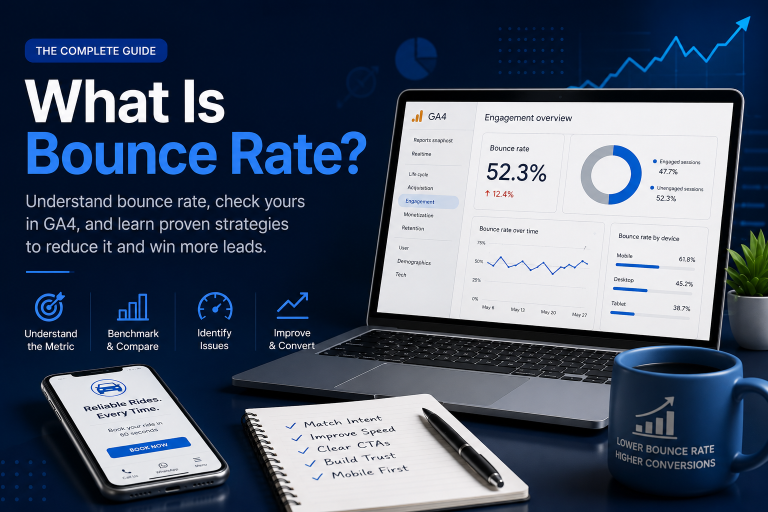
Bounce rate is the percentage of visitors who land on your website and leave without any meaningful interaction. In Google Analytics 4 (GA4), that means unengaged sessions – visits lasting under 10 seconds, with no conversion events and no second pageview – divided by the total number of sessions.
At Inteliware Growth, we specialise in converting high-intent traffic into paying clients for service businesses. Bounce rate isn’t a vanity metric; it tells you whether your landing page is doing its one job. A high bounce rate silently drains your ad budget. An optimised one becomes your best lead generator. Here’s how to understand bounce rate, check yours, and, most importantly, fix it.
How bounce rate works in GA4
If you’re coming from Universal Analytics, forget the old definition. In GA4, a bounce isn’t just a single-page visit. It’s an unengaged session. A session counts as engaged if it meets any of these criteria:
- Lasts longer than 10 seconds
- Includes a conversion event (form submission, phone click)
- Has two or more pageviews
So, a visitor who lands on your cleaning service page, scans for eight seconds and leaves without clicking – that’s a bounce. This redefinition makes bounce rate a much truer measure of attention.
The calculation is simple: Bounce Rate = (Unengaged Sessions / Total Sessions) × 100
GA4 displays this metric directly in your reports; you don’t need to calculate it manually every time. But knowing the formula helps you appreciate the weight every percentage point carries.
What is a good bounce rate?
A healthy bounce rate for most service websites sits between 40% and 60%. The exact target shifts depending on your page type and industry. This table gives you a practical benchmark:
| Bounce Rate | Assessment | What It Usually Means |
|---|---|---|
| 26% – 40% | Excellent | Instant match with visitor intent. Often seen on high-converting local service landing pages. |
| 41% – 55% | Average/Good | Solid, but CTA placement or load speed might still be tweaked. |
| 56% – 70% | Above average | A warning sign. Content, speed or messaging underperform for a significant slice of traffic. |
| Over 70% | Poor | Strongly indicates mobile issues, slow load times or a mismatch between ad and landing page. |
Context is everything. A blog post that perfectly answers a single question can have a 75% bounce rate and still be a success. But a doctor’s “Book an Appointment” page at 75% is leaking patients. Always pair bounce rate with conversion rate and average engagement time.
Bounce rate vs. Exit rate
These two metrics often get confused, but they measure different things:
- Bounce rate: the percentage of sessions that start and end on the same page without any engagement. The session both begins and dies there.
- Exit rate: the percentage of all views of a page that were the last in a session. The visitor might have browsed three other pages before exiting on this one.
All bounces are exits, but not all exits are bounces. If a potential immigration client reads your [services page](https://inteliwaregrowth.com/services/), then a case study, and finally leaves from your contact page, that contact page has an exit rate – but no bounce. The bounce happened only if they left from the landing page straight away.
Why your bounce rate might be high
In our audits for Taxi Companies, law firms and clinics, we rarely find a single cause. Usually, it’s a combination of quiet killers. Here are the most common ones:
- Mismatched search intent : Your ad promises “Fixed-price Heathrow transfers” but your landing page talks about your company’s 15-year history. They bounce.
- Slow mobile load speed : According to Google’s own research, as page load time goes from one second to three seconds, the probability of bounce increases by 32%. For a ride booking page, a two-second delay feels unforgivable.
- Poor mobile experience : Over 60% of service searches happen on a phone. If your booking form needs pinching and zooming, visitors abandon it instantly.
- Weak or confusing CTAs : “Submit” says nothing. “Book My Free Consultation” or “Get a Quote in 60 Seconds” tells visitors exactly what to do.
- Lack of trust signals : A clinic’s page without visible reviews, professional photos or a clear phone number signals low credibility, triggering rapid exits.
How to find your bounce rate in ga4
- Sign in to your GA4 property and go to Reports.
- Navigate to Engagement > Pages and screens.
- If the Bounce Rate column isn’t visible, click the pencil icon (customise report) and add it from the Metrics list.
- Look for outliers: pages with abnormally high traffic and bounce rates above 60% are your priority. Cross-reference them with conversion data.
7 proven ways to reduce bounce rate (and win more leads)
Reducing bounce rate isn’t about tricking visitors. It’s about delivering instant value and a frictionless next step. Here’s what we’ve applied successfully for our niche service clients.
-
Match your headline to the ad promise If a Google Ad says “Immigration Solicitors London – Free Assessment,” your landing page headline must echo that exactly. When visitors feel they’ve landed in the right place, they stay. We help clients map ad copy to page content in our Google [Ads Management services](https://inteliwaregrowth.com/GoogleAds).
-
Achieve a blazing-fast mobile load time Compress images, minimise code and use a CDN. Aim for a Google PageSpeed Insights score above 90 on mobile. A one-second improvement in load time can drastically reduce bounces on booking pages.
-
Use one dominant CTA above the fold Don’t make visitors search. For a cleaning company, a big button reading “Get My Price in 60 Seconds” directly under the headline cuts decision friction. Every page should have a single primary conversion goal.
-
Add skimmable social proof Short, punchy testimonials build trust without slowing down the reader. Try a carousel with quotes like “On time, spotless clean – 5 stars” or “Trusted by 3,000+ patients.” This reassures without adding scroll depth.
-
Place a sticky click-to-call button on mobile High-stress service moments (a late-night taxi, a dental emergency) demand immediate contact. A persistent call button on mobile stops frustrated bounces and turns them into phone leads.
-
Add internal links to answer the next question At the end of a blog about bounce rate, link to a related case study. Inside a taxi service page, link to “Areas We Cover.” These natural internal paths prompt that crucial second click and reduce bounce rate. Read real examples in our case studies.
-
A/B test relentlessly Test headline variations, CTA colours and hero images. In one test for a clinic’s booking page, swapping a stock photo for a genuine team image and changing the CTA to “Speak to a GP Today” cut the bounce rate by 22%. Small changes compound.
When a high bounce rate isn’t a problem
Bounce rate alone can mislead you. These scenarios are perfectly healthy:
- Satisfying single-query blog posts : A reader gets the answer to “What is a valid visa fee?” and leaves satisfied. That’s a win.
- Quick-lookup contact pages : Someone grabs your phone number and address in two seconds and calls. The bounce rate might be 90%, but the session generated a real lead.
- Single-page app previews with event tracking : An app startup tracks downloads and sign-ups as events, so second pageviews aren’t needed.
Always weigh bounce rate against conversions. If leads are flowing, a high bounce rate on a contact page is irrelevant.
How Inteliware Growth fixes high bounce rates
We don’t just report numbers. Our 5-step framework turns bounces into bookings for niche service businesses. Whether you run a taxi company needing instant ride requests or an immigration law firm chasing qualified consultations, we diagnose the exact leakage points and rebuild your landing experience to hold attention and convert.
Audit — We analyse GA4 data, heatmaps and competitors to pinpoint exactly where and why visitors bounce.
Strategy — We map every click to a conversion path, setting targets for bounce rate, engagement time and cost per lead.
Execution — We build speed-optimised landing pages with copy and design that mirror user intent.
Tracking — Custom dashboards let you watch bounce rate, conversion rate and ROI in real time.
Scale — Once a page is working, we push budget into what’s proven.
Contact Us
📞 +92 344 3503901
📧 sales@inteliwaregrowth.com
📍 London, United Kingdom
Frequently Asked Questions
What is bounce rate in simple words? The percentage of visitors who enter your site and leave without engaging (no clicks, no conversion, less than 10 seconds in GA4).
How is bounce rate different from exit rate? Bounce rate captures single-page, no-interaction sessions. Exit rate captures all sessions that ended on a page, even if the user browsed other pages first.
What’s a good bounce rate for a law firm or taxi website? 40% – 55% is a solid range for service landing pages. Rates below 40% usually mean your page instantly matches intent.
Does a high bounce rate hurt SEO? Not directly, but it often correlates with poor user experience signals (low dwell time), which can indirectly influence rankings.
Can my bounce rate be 0%? Yes, if every single session on a page is engaged. Rare, but achievable on exceptionally effective landing pages.
Why did my bounce rate change in GA4? GA4 only counts unengaged sessions as bounces, unlike Universal Analytics. This gives a more accurate view of user attention.