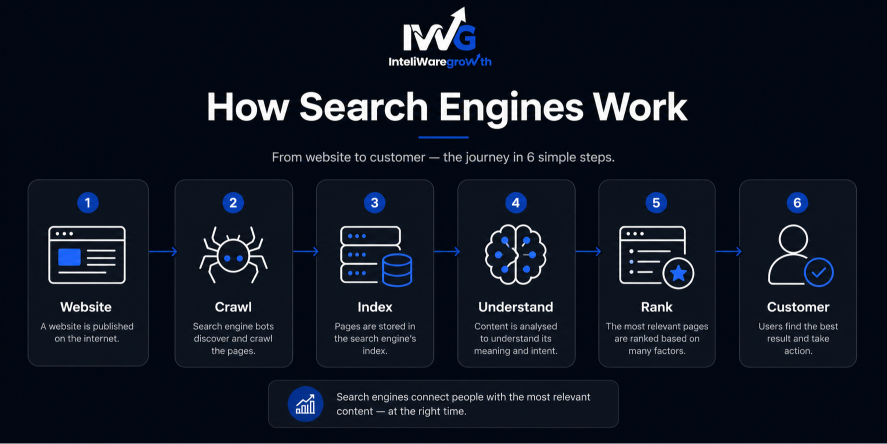
A robots.txt file is a plain text document stored in your website’s root directory. It gives simple instructions to search engine crawlers and AI bots about which parts of your site they can visit and which they should avoid. Think of it as a polite “do not disturb” sign for specific corners of your digital property.
For SEO, robots.txt matters because it directly influences crawl budget – the number of pages a bot will crawl during each visit. By steering crawlers away from low-value pages (like internal search results, duplicate content or shopping carts), you ensure they spend time on the content that actually drives leads and revenue. It also helps you hide staging sites, admin panels and thank-you page from the crawl queue.
At Inteliware Growth, we build performance frameworks for service businesses, including taxi companies, immigration law firms, app startups, Cleaning Companies and medical clinics. Every server request must earn its keep. In this guide, you’ll learn exactly how robots.txt works and how to make it work for you.
Key SEO concepts to know before you edit your robots.txt
1. Crawling vs. indexing: the critical distinction The most common SEO mistake is confusing crawling with indexing. Crawling is when a bot visits and reads a page; robots.txt controls this. Indexing is when a bot stores that page and may show it in search results; robots.txt does not control this. If you block a URL in robots.txt but another site links to it, Google can still index the page – often with a broken-looking title and no description. To truly keep a page out of the index, use a noindex meta tag, not robots.txt.
2. Saving your crawl budget Search engines assign a limited crawl budget to your site. For larger websites, wasting that quota on redundant pages – parameter-laden booking filters, printer-friendly versions and session IDs – means your high-value service pages might not get crawled or refreshed frequently. A tight robots.txt file blocks those low-value areas and directs bot energy where it counts. Google’s guide on crawl budget management explains this in detail.
3. Protecting sensitive or irrelevant content Robots.txt can hide areas that shouldn’t appear in search results or waste bandwidth, such as:
- Staging and development environments
- CMS login panels (e.g., /wp-admin/)
- Form confirmation and “Thank You” pages
- Internal search result pages
4. Blocking unwanted AI and scraper bots Modern robots.txt files also manage access for AI training crawlers like GPTBot, CCBot and ClaudeBot. Blocking them helps protect your original content and reduce server load, even though it won’t stop truly malicious scrapers.
How does robots.txt affect SEO?
Robots.txt isn’t a direct ranking factor, but its indirect influence is enormous.
Crawl efficiency – By blocking pointless pages, you make sure Google spends its time on your money pages: service descriptions, local landing pages and case studies. For an immigration firm with hundreds of country-specific guides, this keeps those critical URLs fresh. Indexation control (don’t misuse it) – Many people try to use robots.txt to remove a page from Google. When that fails, they panic. The file’s true job is to prevent crawling, not indexing. Always use noindex if you need a page fully removed from search results. Duplicate content management – Booking engines and e-commerce sites often create near-duplicate URLs. Disallowing them helps avoid poor quality signals and keeps the index focused on unique content. Resource protection – Unnecessary bot requests strain servers, especially for dynamic apps like taxi booking platforms. A sensible robots.txt reduces wasted requests, leaving more horsepower for real users.
How to find and check your robots.txt setup
The file must live at the root domain. Simply type:
https://yourwebsite.com/robots.txt
If it’s missing (a 404 error), crawlers are free to visit everything – usually fine for very small sites but risky for larger ones. To test your setup, use Google Search Console’s robots.txt Tester under Settings. It lets you submit a URL and see immediately whether your file blocks or allows Googlebot. Always test before pushing changes live.
Robots.txt syntax: the essential directives
The syntax is simple but case-sensitive. You can refer to Google’s documentation for the full specification.
- User-agent: The crawler you’re addressing. * applies to all bots.
- Disallow: Tells the bot not to crawl a path. Disallow: /private/ blocks that folder.
- Allow: Creates an exception within a disallowed section.
- Sitemap: Points to your XML sitemap location.
Basic example for a service business using WordPress:
text User-agent: * Disallow: /wp-admin/ Allow: /wp-admin/admin-ajax.php Disallow: /thank-you/ Sitemap: https://www.example.com/sitemap.xml
To block AI scrapers, add separate groups:
text User-agent: GPTBot Disallow: / User-agent: CCBot Disallow: /
Always separate rule groups with a blank line to prevent merging errors.
Industry-specific robots.txt strategies
At Inteliware Growth, we tailor technical SEO to the business model. Here’s how each of our core niches uses robots.txt for maximum performance.
Taxi & private hire companies Booking engines generate infinite parameterised URLs. Block /booking/confirmation?* and filter parameters to prevent index bloat, keeping the focus on location landing pages that capture “taxi near me” searches. Explore our [taxi marketing services](https://inteliwaregrowth.com/TaxiMarketing) to see how we build complete growth engines for private hire firms.
Immigration law firms Staging copies of country-specific landing pages are common. Disallow /staging/ on the live site and always reinforce with noindex. Block internal search: Disallow: /?s=.
App-based startups Developer docs and debug folders shouldn’t be crawled. If they sit on the same domain, block them while keeping the app download pages open and clean.
Cleaning companies Local service area pages are your SEO gold. Block shopping cart and account URLs (/cart and /my-account) to save crawl budget for suburb-specific content.
Doctors & Clinics Patient portals and appointment confirmations have zero SEO value but consume crawl resources. Block paths like /patient-portal/ and session ID parameters.
Blocking AI scrapers: why it matters now
AI training crawlers from OpenAI, Anthropic and Common Crawl routinely scrape websites. If you publish original legal guides, medical advice or unique service descriptions, you may not want that content ingested without consent.
Blocking them in robots.txt is your first line of defence:
text User-agent: GPTBot Disallow: /
User-agent: anthropic-ai Disallow: /
User-agent: CCBot Disallow: /
Legitimate bots will comply, although malicious ones will not. For a law firm publishing detailed visa guides, this small addition protects proprietary knowledge.
Common robots.txt mistakes that hurt SEO
Blocking CSS and JS files – If Googlebot can’t render your design, mobile-usability issues and ranking drops often follow. Using robots.txt to remove a page from Google – It won’t work. Use noindex. Trailing slash carelessness – Disallow: /blog will also block /blog-post. Be exact: Disallow: /blog/. Leaving Disallow: / after a staging migration – Double-check your live file immediately after any move. Forgetting to declare the sitemap – Not mandatory but helpful for discovery. Overusing wildcards – Patterns like Disallow: /*? can accidentally block legitimate URLs. Test thoroughly.
How to create and test your robots.txt file
1.Open a plain text editor (Notepad, not Word). 2.Write your directives, starting with a User-agent. 3.Save the file exactly as robots.txt (all lowercase). 4.Upload to the root directory of your domain. 5.Visit yourdomain.com/robots.txt to confirm it’s live. 6.Use Google Search Console’s tester to check several important URLs. 7.For WordPress users, SEO plugins like Yoast let you edit the file from the dashboard – much safer than FTP.
Actionable checklist: optimise your robots.txt today
- Confirm the file sits at the root and returns a 200 status.
- Add a link to your XML sitemap.
- Block staging areas, /wp-admin/, /thank-you/ and internal search results.
- Ensure CSS, JS and image folders are not blocked.
- Add separate rule groups for AI scrapers if desired.
- Test with Google’s robots.txt Tester for five critical URLs.
- If pages need removal from the index, implement noindex instead.
- After any migration, check that Disallow: / hasn’t been left on the live site.
- Review crawl stats in Search Console quarterly.
Conclusion
A well-configured robots.txt file quietly directs crawlers toward your most valuable pages while blocking waste. It conserves crawl budget, avoids duplicate-content trouble and keeps admin areas out of the index. The key is understanding that crawling and indexing are separate processes – and robots.txt only controls one of them.
At Inteliware Growth, we treat technical SEO as a performance lever. Whether you operate a taxi platform, an immigration law firm, an app startup, a cleaning business or a medical clinic, your robots.txt setup should match your conversion goals. One misconfiguration can silently erode your organic traffic. Done right, it gives you a genuine competitive edge. Check out our case studies to see how we’ve scaled service businesses just like yours.
Contact Us
📞 +92 344 3503901
📧 sales@inteliwaregrowth.com
📍 London, United Kingdom
Frequently asked questions
Does every website need a robots.txt file? No, but for any site with booking funnels, admin panels or staging areas, it’s strongly recommended to manage crawl efficiency.
Can robots.txt improve my Google rankings? Indirectly, yes. By focusing crawlers on your key content, it helps Google understand your site better. It doesn’t boost rankings like a backlink, but a clean technical foundation supports stronger performance.
How do I block Google from indexing a page? Use a <meta name="robots" content="noindex"> tag or an X-Robots-Tag: noindex HTTP header. Never rely on robots.txt alone.
Is robots.txt case-sensitive? Yes. File names and directory paths are case-sensitive on most servers.
What happens if I accidentally block my whole site? Google will stop crawling your pages and rankings will drop. Fix the file immediately, test it and request a re-crawl via Search Console. The damage is usually reversible.
Can I block specific pages rather than entire directories? Yes. Use Disallow: /exact-page-url for a single file or pattern matching to block groups like Disallow: /*?session_id=.
Do all bots obey robots.txt? No. Legitimate search crawlers do, but many scrapers ignore it. It’s part of a broader security and SEO strategy, not a lock.